




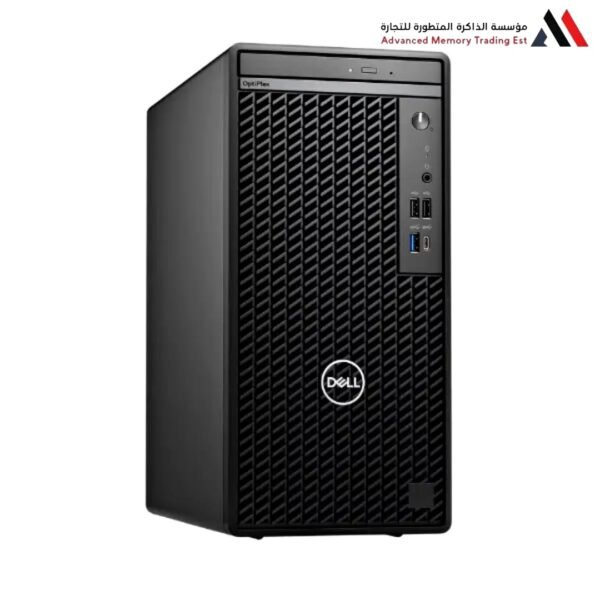
Dell Tower with Intel Core i3-14100
Dell Tower with Intel Core i3-14100
In-Depth Review: Dell Tower with Intel Core i3-14100
Unlocking Maximum Potential in the Budget Segment
When discussing Dell Tower desktop computers equipped with the 14th Generation Intel Core i3 processor, we are not merely talking about a “cheap” machine with limited performance. We are addressing a massive technological leap that has propelled the i3 series to outperform i7 processors from relatively recent generations.
In this report, we will analyze every component of this setup, from the heart of the machine (the processor) to the chassis and upgradeability, to clearly understand this device’s capabilities.
I. Analyzing the Beating Heart (Intel Core i3-14100)
The processor is the most critical component in the equation. The i3-14100 belongs to the Raptor Lake Refresh family, which is the refined version of the 13th generation. Here are the details that make it special:
1. Architecture and Speed
Unlike i5 and i7 processors that come with two types of cores (Performance and Efficiency), the i3-14100 focuses purely on performance (Pure Performance).
Core Count: It features 4 Performance Cores (P-Cores).
Thread Count: It has 8 threads, meaning each core can handle two tasks simultaneously thanks to Hyper-Threading technology.
Staggering Speed: Here lies the surprise. The base speed of the processor is 3.50 GHz, but under load (Turbo Boost), the speed reaches 4.70 GHz. This figure was previously reserved for high-end categories. This high speed means instant responsiveness when opening programs and incredibly smooth browsing of heavy websites.
2. Cache Memory (Smart Cache)
The processor comes with a cache memory of 12 MB of Intel® Smart Cache. This relatively large size for an i3 processor helps speed up data transfer between the processor and the RAM, reducing “hanging” or stuttering during daily work.
3. Integrated Graphics Processor (UHD 730)
The processor comes with an internal graphics card, the Intel UHD Graphics 730.
What does it offer? It supports a display resolution up to 8K at 60Hz via DisplayPort. It supports running up to 4 monitors simultaneously (depending on the motherboard ports in the Dell machine).
Video Decoding: It features support for modern decoding techniques (Codecs), making it excellent for watching 4K YouTube content or streaming platforms like Netflix without overloading the main processor.
II. The Dell Tower Platform (Chassis and Motherboard)
Purchasing the processor inside a machine from Dell (whether it is an Inspiron, Vostro, or OptiPlex) adds a different value than assembling the device with separate components:
1. Cooling Engineering and Quietness
Dell desktop computers are famous for their well-designed airflow engineering. The machine’s chassis (Case) is designed to draw in cold air from the front and exhaust it from the rear. With the i3-14100 processor, which has low power consumption (maximum turbo power is about 110W, and average is 60W), the machine will operate in total silence 95% of the time. The fans will not have to spin at maximum speed except in very rare cases.
2. Durability and Build Quality
Dell machines undergo harsh testing (temperature, vibration, USB ports). This means the machine is designed to work for many years (5-7 years) without problems in the motherboard or capacitors, making it an excellent investment for offices and businesses.
3. Ports and Connectivity
In modern Dell models that support the 14th generation, you will typically find:
Fast USB 3.2 Gen 1 ports for data transfer.
A USB-C port (in the vast majority of models).
Support for Wi-Fi 6 and Bluetooth 5.3 (check the exact specifications of the model offered to you), which eliminates the need for wired internet cables.
Practical Performance (What to Expect?)
Let’s give a realistic assessment of performance away from theoretical numbers:
1. Office and Productivity Scenario (10/10)
In Microsoft Office programs (Word, Excel, PowerPoint), this machine is a little “beast.” Even with massive Excel files containing thousands of cells and complex formulas, the i3-14100 processor will process them at a staggering speed thanks to the high single-core performance. Browsing the internet with 20 or 30 open tabs will not cause any slowness (provided sufficient RAM is available).
2. Light Content Creation (7/10)
Can you use Photoshop or Illustrator? Yes, absolutely. For simple photo editing, social media designs, and editing short videos in 1080p resolution, the machine is excellent. However, if you intend to edit long 4K videos or complex 3D rendering, you will need an i5 or i7 processor and a dedicated graphics card.
3. Gaming
Without a dedicated graphics card, the machine is not for modern AAA games. However, it can run light eSports games like League of Legends, Valorant, or Minecraft at low to medium settings. If you add a mid-range graphics card (like an NVIDIA RTX 3050 or RTX 4060) in the future, the machine will turn into a very powerful gaming platform, as the i3-14100 processor is powerful enough not to cause a “bottleneck” with these cards.
IV. Conditions for Ideal Performance (Expert Advice)
To get the performance I described above, you must ensure that the Dell machine you are buying contains the following complementary specifications; otherwise, you will waste the processor’s power:
Random Access Memory (RAM):
Minimum acceptable: 8GB.
Highly recommended: 16GB.
Reason: Windows 11 and browser programs are voracious consumers of RAM. 8GB may fill up quickly, causing the machine to slow down. 16GB gives the processor room to breathe and create.
Storage Unit:
Never buy the machine with an HDD as the primary drive.
The drive holding Windows must be an M.2 PCIe NVMe SSD. This type is 10 to 30 times faster than a regular hard drive. This is what will make your machine boot in 10 seconds and open programs as soon as you click on them.
V. Is it Worth Buying? Final Verdict
A Dell Tower with an i3-14100 processor is the king of value for money in 2024-2026.
It is for you if: You are a student, accountant, programmer (beginner/intermediate), administrative employee, or a home user who wants a fast machine that lasts for years without needing to change it.
It is not for you if: You are a professional content creator (Video Editor), an architect using heavy rendering programs, or a professional gamer who wants the highest frame rates without buying an additional graphics card.
Conclusion: This processor offers performance comparable to 9th generation i9 processors (which cost a fortune a few years ago). Owning this power in a reliable Dell machine at a budget price is a winning deal by all measures.
Related products




Reviews
Clear filtersThere are no reviews yet.