




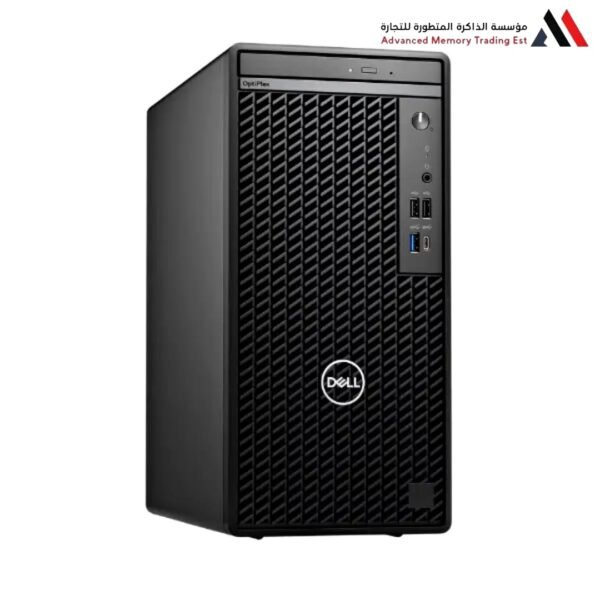
Dell OptiPlex 7010 with Intel Core i7-13700
Dell OptiPlex 7010 with Intel Core i7-13700
Comprehensive Review: Dell OptiPlex 7010 with Intel Core i7-13700
Enterprise-Grade Power Meets Uncompromising Performance
The Dell OptiPlex 7010 represents the pinnacle of evolution in Dell’s long-standing OptiPlex line. In 2023, Dell streamlined its naming convention, making “7010” the overarching umbrella for its modern, high-performance business desktops. When paired with the Intel Core i7-13700 processor from the 13th Generation, this machine transforms from a standard office PC into a compact workstation capable of meeting the demands of the most rigorous professional workflows.
I. Hybrid Processing Power: Intel Core i7-13700
The processor is the heart of this machine, and the i7-13700 is a true powerhouse from the Raptor Lake family. It is designed to strike a perfect balance between raw power and energy efficiency.
1. Advanced Hybrid Architecture
The processor features a stunning composition of 16 total cores and 24 threads:
8 Performance Cores (P-Cores): These are dedicated to heavy lifting—tasks requiring raw speed like 3D rendering, massive file compression, and engineering software. They can boost up to 5.20 GHz.
8 Efficiency Cores (E-Cores): These handle background processes, web browsing, and system updates, leaving the P-Cores dedicated entirely to your primary workflow.
The Bottom Line: With 24 threads, the system can handle dozens of heavy applications simultaneously without experiencing input lag.
2. Integrated Graphics (Intel UHD 770)
While it is an integrated graphics solution, the UHD 770 delivers impressive performance for supporting 4K and 8K displays. It is ideal for displaying complex financial charts, watching high-definition content, and professional photo editing without immediately requiring a dedicated graphics card.
II. The OptiPlex 7010 Platform: A Long-Term Investment
The OptiPlex line is strictly “Business-Class,” meaning it is engineered to operate for 5 to 10 years with minimal maintenance.
1. Artificial Intelligence with Dell Optimizer
The machine comes equipped with Dell Optimizer software, which uses AI to learn how you work.
ExpressResponse: The software accelerates the opening of your top 5 most-used applications.
Intelligent Audio: It enhances audio quality during virtual meetings and automatically removes background noise.
2. Hardware-Level Security
In the corporate world, security is paramount. The OptiPlex 7010 provides:
SafeBIOS: A feature that protects the BIOS from attacks and automatically restores it if a breach is detected.
TPM 2.0: A dedicated chip for encrypting data and passwords.
Port Protection: The ability to programmatically disable USB ports to prevent data leakage.
III. Design Flexibility and Upgradeability
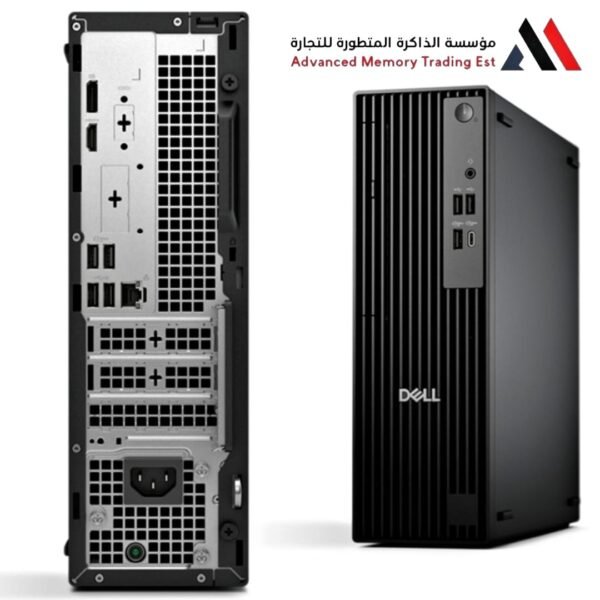
The 7010 generally comes in three form factors: Tower, SFF (Small Form Factor), and Micro. Regardless of the size, the internal design focuses on accessibility.
Tool-less Design: You can open the chassis and upgrade RAM or add a hard drive without using a screwdriver, facilitating easy maintenance.
RAM Support: The device supports the latest and fastest DDR5 RAM, with capacities reaching up to 128GB (in the Tower version), making it ready for future demands.
Storage Units: It supports NVMe PCIe Gen 4 ports, the fastest storage units currently available, allowing Windows to boot and applications to open in a fraction of a second.
IV. Ideal Use Cases
Thanks to the i7-13700 processor, this machine excels in the following fields:
Financial and Accounting: Processing Excel files with millions of records and complex formulas without the application freezing.
Software Development: An ideal environment for programmers running emulators, local servers, and containerized applications simultaneously.
Engineering and Design: Running software like AutoCAD, Revit, and Photoshop smoothly, especially if the device is equipped with 32GB of RAM.
Education and Research: A powerful workstation for researchers needing to analyze massive statistical datasets using software like SPSS or R.
V. Technical Recommendation (Optimal Configuration)
To harness the full power of the i7-13700 processor within the OptiPlex 7010, we recommend the following configuration:
RAM: Do not settle for less than 16GB DDR5 (32GB is highly recommended for professionals).
SSD: Use a 512GB or 1TB NVMe SSD as the primary drive for Windows, with the option to add a large HDD for bulk storage.
Ports: Ensure you request the device with DisplayPort 1.4 to fully utilize the resolution of modern monitors.
VI. Pros and Cons at a Glance
Pros:
The i7-13700 delivers performance comparable to professional workstations.
Smart power consumption and excellent thermal management keep the device quiet.
Support for Intel vPro technology for remote management (in supported models).
Extremely robust construction designed for heavy daily use.
Cons:
Higher cost compared to consumer-grade devices (like Inspiron).
In the SFF size, options for adding powerful dedicated graphics cards are limited by the power supply size.
Final Verdict
The Dell OptiPlex 7010 with i7-13700 is more than just a computer; it is a powerful productivity tool. If your work relies on speed, security, and unwavering reliability, this machine is a winning investment that will serve you for years to come without the need for an immediate upgrade. It combines the raw “muscles” of modern processing with the intelligent “brain” of enterprise management.
Related products



Reviews
Clear filtersThere are no reviews yet.